Pimped Photography Laptop Case, Modified

If you’ve been tuned in for a while, you’re no doubt up to speed on our DIY Pimped Laptop Case. Rumors flew around photography circles that the only thing it didn’t have was missile launchers. Well, that little video just had its one year anniversary last week and it’s still getting tons of traffic, comments and–my favorite part–proposed modifications. The most recent such modification that deserves mention is really simple and very useful and it comes to us from Seattle-based (woot woot!) aerial landscape specialist Tabb Firchau.
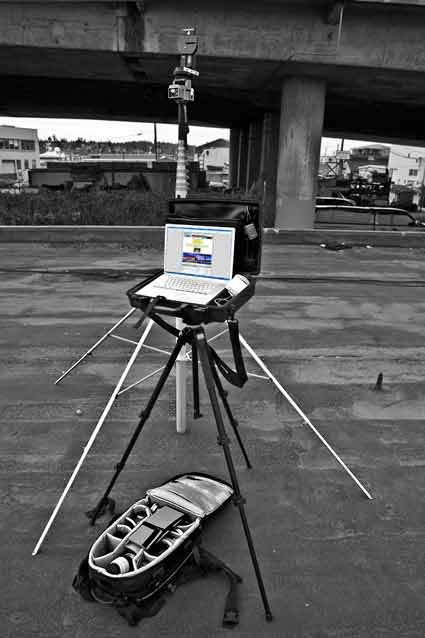
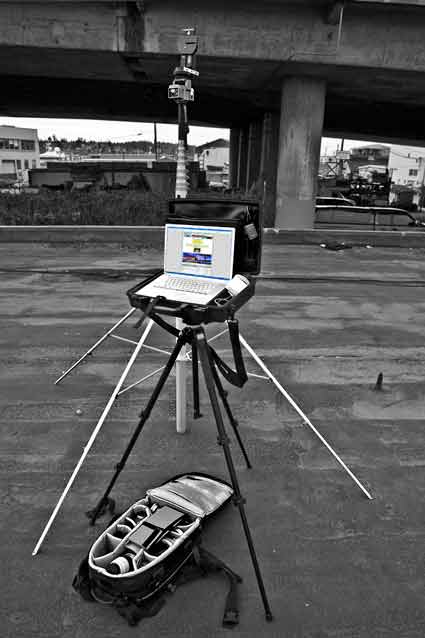
Seems that Tabb got tired of bending over to mess with his laptop and so he whipped up a simple little plan to mount this puppy to a tripod without sacrificing the waterproof aspects of the case. $38 bucks for the platform. Add some industrial Velcro and you’re set.
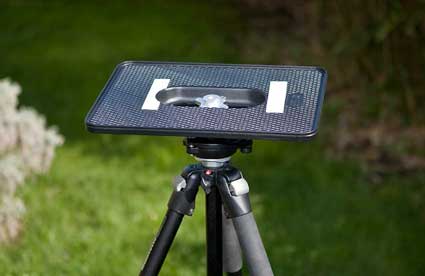
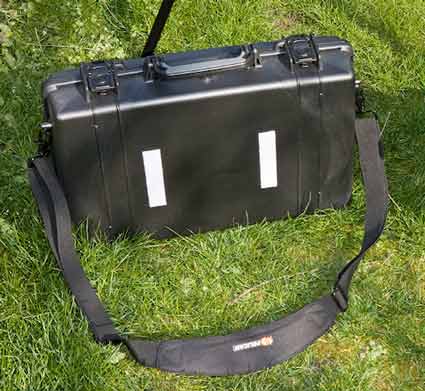
Buy the Manfrotto 3290 platform here. You’re on your own for tracking down the Velcro.

Thanks Tabb – we’re putting this mod to use for sure, and I promise it’s not just because you sent me this cool, navigable Quicktime VR of the park that our Seattle studio overlooks (grab the image below with a click and drag):
BTW, make time to visit Tabb’s site to check out the images and video he can make from his remote control helicopter. I was blown away.

Lastly, as many of you surmised from a snapshot that sneaked into an earlier post, we’re working with another DIY iteration of the case and would love to learn from what you’re doing and thinking. So, if you’ve by chance pimped your laptop case or done some thinking about it, do share in the comments below.

[OR if you don't have time to make your own silly little case, the smart folks at Tidy Pixels have done a mack daddy version all for you called the Mk7. Indeed it looks very familiar, but unlike the one we pioneered in 2006 this one comes fully loaded, and with some style too. I never would have started an entire company around the the pimped laptop idea, but I'm glad someone did. Who wouldn't love to have one or two of those!]

Related posts:

    Photography Laptop Case (aka Pimp Your Laptop Case)
    Laptop Case Vid Follow-up (aka Pimp Your Laptop Case: the nitty gritty)
    Chase Jarvis SHORTS: Pimped Photography Van

---
Get my every move: Follow Chase Jarvis on Twitter
Get exclusive content: Become a Fan on Facebook

    42 Responses to “Pimped Photography Laptop Case, Modified”

    1. Toddiferous Tuesday - 1st of April, 2008 at 5:59 am #

      Thanks Chase, great mod. I don’t have the laptop case, but I’m going to do this with my MacBook Pro. Just a little velcro on teh bottom and voila!

      Cool aerial QTime btw. Did he do that with a blimp?

    2. Brett Tuesday - 1st of April, 2008 at 8:42 am #

      Great blog, cool to see people modding stuff instead of lining the manufactures pockets

    3. Linda Wallace Tuesday - 1st of April, 2008 at 10:08 am #

      Gorgeous photos! Yeah for Blogger’s “Blogs of Note,” or I might never have seen your work.

    4. JAMJARSUPERSTAR Tuesday - 1st of April, 2008 at 10:39 am #

      Great blog – love the pics and your modified stuff, it’s really cool!

      http://scarletsculturegarden.blogspot.com
      http://jamjarsuperstar.blogspot.com

    5. Mina Jade Tuesday - 1st of April, 2008 at 11:20 am #

      Good pics – I loved the photo of the blond angel on American Photo’s cover.

    6. punto Tuesday - 1st of April, 2008 at 12:49 pm #

      GREEEEEEEEAT BLOG MAN..!!!!

    7. John Leonard Photography Tuesday - 1st of April, 2008 at 1:30 pm #

      OK, the case is cool, but I want to know about that pole set-up that is going on. I have a use for something like that.

    8. TAB Photographic Tuesday - 1st of April, 2008 at 1:57 pm #

      hang on, can we talk about the possibilities with a remote control helicopter a bit more??? ;o) Crafty in the city for shooting through peoples windows. Hey, that would make a rockin book. Through the windows. all shot with a remote helicopter… Yup…

    9. Zeke Tuesday - 1st of April, 2008 at 3:06 pm #

      I’m with John. What’s up with that lightstand/tripod. What’s it called, how tall can it go, and where can I get one?

      http://nicephotomag.com

    10. Carolyn Tuesday - 1st of April, 2008 at 3:38 pm #

      Congrats on being a Blog of Note.

      Carolyn

    11. R2K Tuesday - 1st of April, 2008 at 7:45 pm #

      : )

    12. Anonymous Wednesday - 2nd of April, 2008 at 1:20 am #

      Well, instead of getting two Lacie Rugged drives, I got two enclosures from http://www.macsales.com, so I get FW800 (instead of 400), USB, I can swap the drives inside (which, for me, is extremely helpful) and it’s cheaper. I also bought a Speck see thru case so I didn’t have to put velcro directly on the MacBook Pro to hold the Compushade. Hope this helps.

      Juan

    13. کبوتر سبز Wednesday - 2nd of April, 2008 at 5:02 am #

      nice :)

    14. Anonymous Wednesday - 2nd of April, 2008 at 5:26 am #

      nice blog you have there !! congrats your the blog of note ..
      can you visit mine? if it is the nest blog on note.. whahaha ..

      http://wron08.blogspot.com

      i’ll w8 for your reply !! thnx paL!

    15. raven Wednesday - 2nd of April, 2008 at 6:30 am #

      hi! good article! would you mind sharing some tips with me.

    16. Chase Jarvis Wednesday - 2nd of April, 2008 at 9:52 am #

      @ anon (Juan):

      Good tip for those who don’t want to tarnish their MacBook Pro. Personally, its just a nice tool for us, so I don’t mind, but I do understand the desire to keep it neat. On the otherhand the Lacie 160 ruggeds DO have bus powered firewire 800s.

    17. Chase Jarvis Wednesday - 2nd of April, 2008 at 9:56 am #

      @ raven: Of course! Actually digging around my blog is a good place to pick up some of the tips I have to offer generally.

      If you have specific questions, bring em to me offline…

    18. Tabb Firchau Wednesday - 2nd of April, 2008 at 10:53 am #

      Hey guys just thought I would chime in for those of you who were interested in the mast setup. It is a 50ft portable mast I use for some low level aerial work.

      Mast comes from:
      http://www.shop.dx-is.com/main.sc

      Remote camera head from:
      http://www.21best.com/21_best/electronic/security/video/pan_tilt/for_sale_.html

      To attach the camera to the mast I use the top section of a monopod.

      Camera head is controlled by remote and I use remote capture on the macbook to review photos as I take them.

      Chase,
      thanks for sharing your original pimped laptop case with me!

    19. voyance Wednesday - 2nd of April, 2008 at 2:26 pm #

      Great blog!

    20. JOSEPH GELB Wednesday - 2nd of April, 2008 at 9:44 pm #

      im gonna get that case

    21. nerdNOTgeekDOTcom Thursday - 3rd of April, 2008 at 12:47 am #

      Nice stuff guys , Im impressed

    22. Me Thursday - 3rd of April, 2008 at 12:32 pm #

      blogs of note is awesome i hope mine to be on there one day

    23. Rick Lohre | Photography Thursday - 3rd of April, 2008 at 7:53 pm #

      Chase,
      You are pushing me man. You are always there with something new, some fresh look at something…you are inspiring.
      I gotta say, I’ve never felt more passionate about what I’m doing and I love it. My wife said to me the other day – “…you are just on fire with the outlook on your photography…”
      You are pushing me man. Always challenging me with how you look at things. I don’t want to necessarily do what you do or be a carbon copy of Chase, but seeing what you do…not to mention your willingness to share it with us is monumental! I am making the transition from Packaging Designer to full time professional photographer and I finally feel like I am finding my “Photographic Self”. I thank you for the push!
      Thanks for opening the black box and contributing to the Photo Community.
      Much props my friend.
      Rick Lohre
      http://www.LohreCreative.com

    24. Everymatter Thursday - 3rd of April, 2008 at 8:19 pm #

      nice one

    25. Mister Fy Friday - 4th of April, 2008 at 4:46 pm #

      hi there, just dropping by to say hello.

      nice blog of photography!!

    26. kristen Saturday - 5th of April, 2008 at 5:11 am #

      Very interesting blog.
      My sons name is Chayse also.

    27. Fox Williams Saturday - 5th of April, 2008 at 9:01 am #

      Looks incredible.. not sure I have any real use for it though!

    28. California Girl Sunday - 6th of April, 2008 at 5:54 am #

      This is such an informative site. I’m sending your feed to my husband, an excellent amateur photographer. I post his photos on my blog. Thank you.

    29. Anonymous Sunday - 6th of April, 2008 at 11:33 am #

      Hi!
      We like to invite you to try our service for adding stickers to your blog!

      Just sign-in at http://www.blogsticker.net/signup

    30. Anonymous Sunday - 6th of April, 2008 at 1:02 pm #

      Do you have something to say to the World that you don’t want to say on your own Blog? Then say it anonymously on BLAST! and get feedback from other Bloggers. BLAST!

    31. Miss Catwalker Tuesday - 8th of April, 2008 at 1:33 am #

      whats so special about Nokia Tube phone?
      http://business-vice.blogspot.com

    32. -10- Tuesday - 8th of April, 2008 at 11:55 am #

      Just found ur blog, and i have to say, ur blog amazing!! so many beautiful pics! i luv photography despite i’m not good into it :D

    33. Me Wednesday - 9th of April, 2008 at 8:00 am #

      Where can I get one?

    34. Chase Jarvis Wednesday - 9th of April, 2008 at 9:30 am #

      @ Me: you can get all the info in the original laptop post here.

    35. MacGyver Sunday - 13th of April, 2008 at 1:20 am #

      Chase, in a previous photo you had posted the hard drives were mounted to the lid of the pelican case as opposed to being mounted beneath the laptop.

      Have you and your crew run into any problems running the portable hard drives mounted vertically like that?

      I’ve modded a Pelican 1495 case for my 17″ Powerbook and put 2 external drives beneath the laptop. Seems to get very hot because of the surrounding foam. I’m wondering if the drives would stay cooler mounted on the inside of the lid. Just worried if the drives would have problems in that position.

    36. Shiana Agarwal Monday - 14th of April, 2008 at 11:37 pm #

      It was a amazing experience to visit this website and read the articles and contents. http://www.saadepunjab.com

    37. Chase Jarvis Wednesday - 16th of April, 2008 at 6:53 pm #

      @ macgyver: minimize the foam underneath or consider lid mounted drives. We have not had a problem (knock on wood) with them mounted as such.

    38. Miss Catwalker Monday - 15th of December, 2008 at 7:53 am #

      interesting blog.keep it up.
      http://starvice.blogspot.com

    39. Fenris Monday - 16th of March, 2009 at 6:21 am #

      One little note: Pelican cases aren’t considered waterproof, at least by the whitewater community anymore. Too many failures of the O-rings or getting crushed. What they use if Watershed bags and if they need hard protection they will put a pelican case inside.

    40. David Thanh Sunday - 30th of August, 2009 at 6:08 pm #

      The new MBPs have a built-in battery now so no more carrying spares. I've ordered an external battery from Hypermac which I'm going to fit into the tray below the laptop. Should give me an additional 14 hours or so for the 150WH battery. I'll let you know how it works out.

    41. MacGyver Sunday - 30th of August, 2009 at 7:19 pm #

      Thanks for your help with the questions I had when I was working on the Pelican 1495 case last year for my old 17" Powerbook.

      Just upgraded to a 15" MacBook Pro this year and did another Pelican case, with a few minor additions this time. You can see the results here

      http://mizomi.blogspot.com/2009/08/location-laptop-case-completed.html

    42. cable Tuesday - 22nd of September, 2009 at 2:57 am #

      Hi,
      I’m speechless, this is truly impressive…Excellent work ! I appreciate your work.Thanks for this nice article.

    Leave a Reply